If you have forgotten your password on nebenan.de, you can reset it at any time by entering your email address and receiving a link to reset it. Also check your spam folder and whether the email address is correct. Instructions for the web version, Android, and iOS apps are available, as well as tips on dealing with saved passwords and blocked senders.
If you have forgotten your password, you can set a new one at any time.
We are happy to show you how it works. First, choose your device:
Note: If you have not received an email to reset your password, please first check your SPAM folder to see if it may have ended up there. If not, it could be that you entered the email address incorrectly or that you are not yet registered with this email address on nebenan.de.
Please also check your email account to see if you may have accidentally blocked the email address no-reply@nebenan.de. Instructions for the most common email providers can be found here:
Outlook - GMX - Yahoo - Web.de - Gmail
For the web version:
Go to nebenan.de/login and click on “Forgot password?”.
Then enter your email address and click “Reset password” if you want to set a new password, or “Request login link” if you want to access your profile directly without resetting your password. You will then receive an email from us with a link.
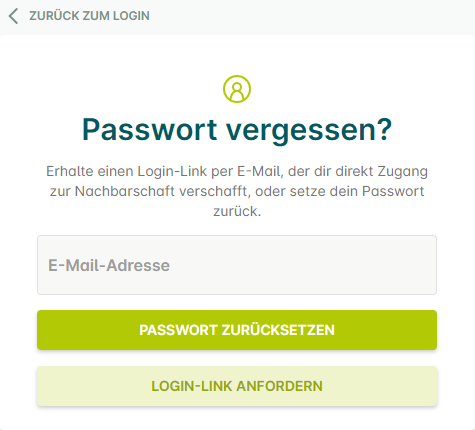
Please also check whether your old password is saved in your browser and delete your browser history if necessary.
For our Android app:
On the app’s home screen, tap “Log in” at the top right of the screen, then tap “Forgot password?”.
Enter your email address here and tap “Next”. You will then receive an email from us with a link.
Please also check whether your password is saved on your device and update it if necessary.
For our iOS app:
On the app’s home screen, tap “Log in” at the top right of the screen, then tap “Forgot password?”.
Enter your email address here and tap “Next”. You will then receive an email from us with a link.
Please also check whether your password is saved on your device and update it if necessary.